eLearning Toolkit
eLearning Toolkit
  • Home
  • Get Started
    • Purpose Statement
    • Online Teaching Readiness Quiz
    • Meet a Learning Experience Designer
    • Course Development & Delivery Process
    • eLearning Guides
  • Design
    • eLearning Framework
    • Teaching Adult Learners
    • Aligning Course Components
    • Creating Course Content
      • Writing Objectives
      • Migrating Online
      • Organizing Content
      • Making a Welcome Video
      • Designing PowerPoints
    • Selecting Instructional Activities
    • Assessing Students
      • Basics of Assessment
      • Designing Rubrics
      • Writing Multiple Choice Questions
  • Teach
    • Accessing your Classroom
    • Netiquette
    • myCourses Tutorials
    • Adobe Connect Tutorials
    • ISET Facilities
  • Reflect
    • Quality Assessment
    • Student Course Evaluations
    • Self-Reflection
    • Debriefing
eLearning
eLearning Toolkit
  • Home
  • Get Started
    • Purpose Statement
    • Online Teaching Readiness Quiz
    • Meet a Learning Experience Designer
    • Course Development & Delivery Process
    • eLearning Guides
  • Design
    • eLearning Framework
    • Teaching Adult Learners
    • Aligning Course Components
    • Creating Course Content
      • Writing Objectives
      • Migrating Online
      • Organizing Content
      • Making a Welcome Video
      • Designing PowerPoints
    • Selecting Instructional Activities
    • Assessing Students
      • Basics of Assessment
      • Designing Rubrics
      • Writing Multiple Choice Questions
  • Teach
    • Accessing your Classroom
    • Netiquette
    • myCourses Tutorials
    • Adobe Connect Tutorials
    • ISET Facilities
  • Reflect
    • Quality Assessment
    • Student Course Evaluations
    • Self-Reflection
    • Debriefing
  • Home
  • Creating Course Content
  • Organizing Content

Organizing Content

Most online courses at McGill School of Continuing Studies are broken down into a series of modules and units. This helps chunk course content into manageable parts so as not to overwhelm students.  Creating modules also allows instructors to define a learning path in their courses and establish a routine.

Modules correspond to a section of a course defined by time (week, day, etc.). Generally, they are identified with a number and a title. Below is an example of module titles. Note that your course homepage may look different.

Each Module should contain a brief overview of its contents. Below is an example of a module overview.

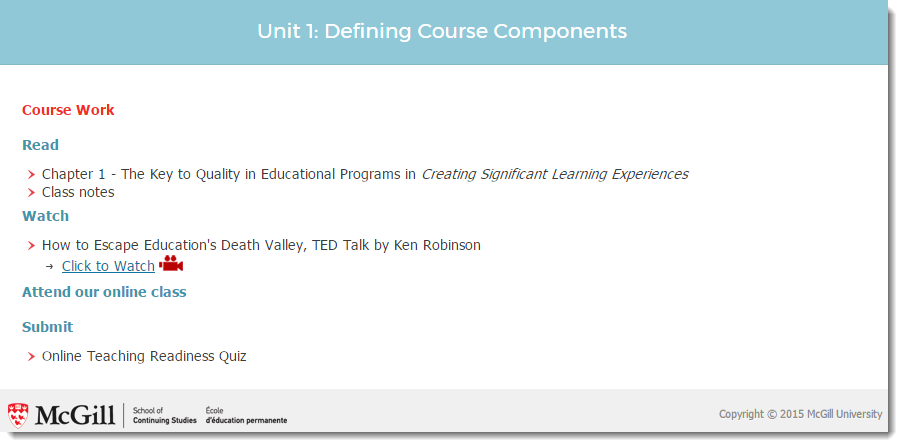
Modules are made of units. Each unit corresponds to a specific topic defined by key concepts and learning outcomes (objectives). They also contain an estimated learning time and a list of coursework.

Estimated Learning Time describes how long it should take students to go through the material in the unit. It includes amount of time spent in class.

Key Concepts are important take-aways from the unit.

Learning Outcomes describe what you want learners to be able to do after completing the unit.

Coursework includes what students are expected to read, watch, review, submit or attend to complete the unit. It is recommended to list these requirements separately from the previous three.